In our journey to re-live old experiences with our retro computers, part of that experience is to use dial-up modems. For example, we did a thorough factory restore to bring our Packard Bell Platinum 2220 back to life [vintage 1997] and while it would be easy to get it online by slapping in a 3com 3c905 or other Ethernet card, that doesn’t feel true to the original system. In the 1980s and 1990s, dial-up was the way of life for all home computing.
So, let’s do it. While we have more involved plans for eventual dial-in modem banks, we thought a good starting point would be a simple Cisco router. The Cisco router is plentiful on eBay, Cisco IOS offers endless configuration options, and this combination was the swiss army knife for the early ISPs of yesteryear.
Although there are plenty of similar Cisco models, we grabbed a Cisco 1841 which has 2x onboard 100M Ethernet ports + 2x WIC add-in module slots. These are easily had on ebay for <$50 with shipping. We then added the WIC-2AM module to it – this is a WIC with two analog modems built in, supporting the latest and greatest of dialup modems at V.90.
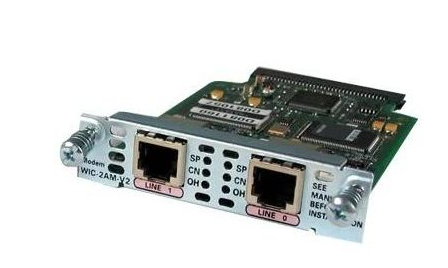
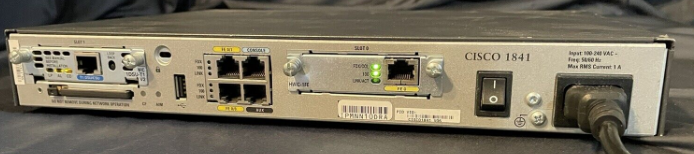
Getting the configuration working was a bit more challenging than expected. A lot of the example dial-in configs found online are for different platforms, such as the AS5300 and related family which is very similar with some sharp differences. And while the WIC-2AM is a versatile and useful card for our purpose, the documentation and examples are all over the place, mostly not relevant to our purpose. After much trial and error, we got a working config that lets us reliably dial in and get online. In our environment, we are using VoIP ATAs to feed analog lines to both our client computers and this Cisco setup, it is working reliably with modem connect speeds usually at 31.2k.
This config is meant to be as simple as possible – authentication is local, the dial-in modem connecting is assigned an IP dynamically from 172.16.1.x, and NAT is used so let the dial-in computer get out to the internet via our LAN:
cisco1841-pots#show run
Building configuration...

Current configuration : 2076 bytes
!
version 12.4
service timestamps debug datetime msec
service timestamps log datetime msec
service password-encryption
!
hostname cisco1841-pots
!
boot-start-marker
boot-end-marker
!
logging message-counter syslog
enable password REDACTED
!
aaa new-model
!
!
aaa authentication login default local
aaa authentication ppp default if-needed local
aaa authorization exec default local
aaa authorization network default local
!
!
aaa session-id common
dot11 syslog
ip source-route
!
!
!
ip dhcp pool dialup
   network 172.16.1.0 255.255.255.0
   dns-server 8.8.8.8
   default-router 172.16.1.1
!
!
ip cef
multilink bundle-name authenticated
!
!
!
!
!
username operator privilege 15 password test
username joe privilege 15 password test
!
!
!
!
!
interface Loopback0
 ip address 172.16.1.1 255.255.255.0
!
interface FastEthernet0/0
 ip address 10.254.255.7 255.255.255.0
 ip nat outside
 ip virtual-reassembly
 duplex auto
 speed auto
!
interface FastEthernet0/1
 no ip address
 shutdown
 duplex auto
 speed auto
!
interface Serial0/0/0
 no ip address
 shutdown
 no fair-queue
!
interface Async0/1/0
 ip unnumbered Loopback0
 ip nat inside
 ip virtual-reassembly
 encapsulation ppp
 ip tcp header-compression
 dialer in-band
 dialer idle-timeout 3600
 dialer-group 1
 async mode dedicated
 peer default ip address dhcp-pool dialup
 ppp authentication pap chap
 routing dynamic
!
interface Async0/1/1
 no ip address
 encapsulation slip
!
ip forward-protocol nd
ip route 0.0.0.0 0.0.0.0 10.254.255.1
!
no ip http server
no ip http secure-server
!
ip nat inside source list 1 interface FastEthernet0/0 overload
!
access-list 1 permit 172.16.1.0 0.0.0.255
dialer-list 1 protocol ip permit
!
!
control-plane
!
!
line con 0
line aux 0
line 0/1/0
 modem Dialin
 modem autoconfigure type default
 transport input all
 autoselect ppp
 stopbits 1
 speed 115200
 flowcontrol hardware
line 0/1/1
 stopbits 1
 speed 115200
 flowcontrol hardware
line vty 0 4
!
scheduler allocate 20000 1000
end
And that’s it – we only have the first modem port (0) configured here, but we can dial in from Windows 95 with one of the locally defined username/password combos and get online.
Once our test Win95 client is online, we can see it here on the Cisco side:
cisco1841-pots#show user
    Line       User       Host(s)              Idle       Location
  tty 0/1/0    mark       Async interface      00:01:46   PPP: 172.16.1.15
and ping it – latency is 400ms but I guess this is just normal for dialup?
cisco1841-pots#ping 172.16.1.15

Type escape sequence to abort.
Sending 5, 100-byte ICMP Echos to 172.16.1.15, timeout is 2 seconds:
!!!!!
Success rate is 100 percent (5/5), round-trip min/avg/max = 400/407/420 ms
Problems and troubleshooting
One reader (Mattia) tried this same setup and was able to connect from Windows 2000, but not Vista:
The debug commands work:
-If I connect from Windows 2000 I see the PPP authentication details appear.
-If I connect from Windows Vista, on the other hand, no log appears, as if the whole thing stops before the authentication phase
– Mattia L
Debugging
From enable mode, run:
terminal monitor
debug ppp auth
debug ppp negotiation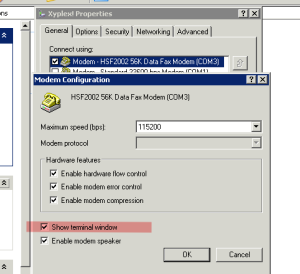
Oleg
Nope, 400 ms is way too big for normal dial-up. Here is the some numbers for different connection types, including dial-up.
http://www.stuartcheshire.org/rants/LatencyResults.html
mark
interesting, how can we troubleshoot this?
Mattia
Very interesting article, I had an unused cisco 1841 with a WIC-1AM board.
I have a problem, the pc I am trying to connect with gives error in the authentication step (so after the call; “verifyng username and password”)
The problem is on the configuration side of the cisco, because if I put a windows server with routing and remote access instead, the connection works.
Can you guys help me?
config:
version 12.4
service timestamps debug datetime msec
service timestamps log datetime msec
no service password-encryption
!
hostname cisco1841
!
boot-start-marker
boot-end-marker
!
!
aaa new-model
!
!
aaa authentication login default local
aaa authentication ppp default if-needed local
aaa authorization exec default local
aaa authorization network default local
!
aaa session-id common
ip cef
!
!
no ip dhcp use vrf connected
ip dhcp excluded-address 192.168.1.2 192.168.1.25
!
ip dhcp pool DHCP-LAN-Pool-1
network 192.168.1.0 255.255.255.0
default-router 192.168.1.1
dns-server 192.168.0.2 192.168.0.1 1.1.1.1 8.8.8.8
!
ip dhcp pool dialup
network 172.16.1.0 255.255.255.0
dns-server 192.168.0.2 192.168.0.1 1.1.1.1 8.8.8.8
default-router 172.16.1.1
!
!
ip name-server 192.168.0.2
ip name-server 1.1.1.1
ip name-server 8.8.8.8
ip auth-proxy max-nodata-conns 3
ip admission max-nodata-conns 3
!
!
!
username [redacted] privilege 15 password 0 [redacted]
!
!
!
!
!
!
interface Loopback0
ip address 172.16.1.1 255.255.255.0
!
interface FastEthernet0/0
description WANPORT
ip address dhcp
ip nat outside
ip virtual-reassembly
duplex auto
speed auto
!
interface FastEthernet0/1
description LANPORT
ip address 192.168.1.1 255.255.255.0
ip nat inside
ip virtual-reassembly
duplex auto
speed auto
!
interface Async0/0/0
ip unnumbered Loopback0
ip nat inside
ip virtual-reassembly
encapsulation ppp
ip tcp header-compression
dialer in-band
dialer-group 1
async mode dedicated
peer default ip address dhcp-pool dialup
ppp authentication pap chap
routing dynamic
!
ip forward-protocol nd
ip route 0.0.0.0 0.0.0.0 192.168.0.1
!
!
no ip http server
no ip http secure-server
ip nat inside source list 1 interface FastEthernet0/0 overload
!
access-list 1 permit 192.168.1.0 0.0.0.255
access-list 1 permit 172.16.1.0 0.0.0.255
dialer-list 1 protocol ip permit
!
!
!
control-plane
!
!
!
line con 0
line aux 0
line 0/0/0
modem Dialin
modem autoconfigure type default
transport input all
autoselect ppp
stopbits 1
speed 115200
flowcontrol hardware
line vty 0 4
!
scheduler allocate 20000 1000
ntp clock-period 17179870
ntp update-calendar
ntp server 193.204.114.232
end
Mattia
Update:
As Mark wrote in his article, following several tests, the connection works smoothly on Windows 2000 but fails on Vista x64.
I will try soon on other systems.
In the meantime I thank Mark for this valuable article, pure gold for enthusiasts 😉
Andrei
Hi, I’m using a cisco 2650XM and still cannot make it work.
I’m running IOS ™ C2600 Software (C2600-IPBASE-M), Version 12.3(25), RELEASE SOFTWARE (fc1) and for some reason, I cannot issue the command “routing dynamic” on the Async0 interface.
Could anyone give me a clue?
Thanks.
Patrick
Hello, thanks for this article. I want to build this in my home, but I have one question. I have small telephone exchamge, that can feed analog lines. With this setup, using WIC in cisco router will I be able to get 56k connection? Or only 33.6k will be possible?
mark
Maximum of 33.6k, 56k requires digital connection on the ISP/server side