Our story today begins the way many readers will be quite familiar with; one evening, while killing time looking at surplus networking equipment on eBay, I happened across a piece of hardware that immediately grabbed my attention.
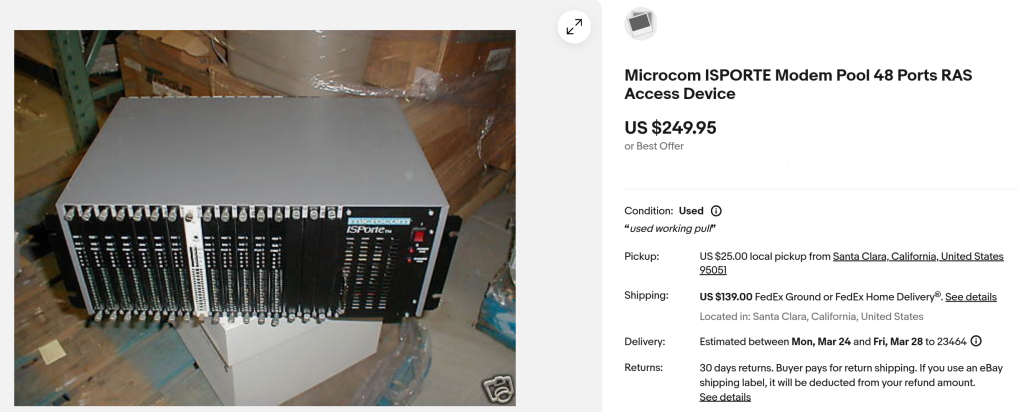

The description did not add much more of value, other than directing me back to the single image provided.
Still, this listing intrigued me. What exactly am I looking at? How did it wind up in this seller’s possession? Why is that one faceplate white? Are there also cards on the back? It sure looks like it. I headed to my favorite search engine and discovered that the internet had largely forgotten about this device. There were a few captures of ads in Boardwatch magazine, and, of course, the eBay listing along with all the other Microcom “porte” products like the DeskPorte modems. Undeterred, I submitted an offer which I thought was fair but certainly low, and to my surprise it was accepted almost immediately. The quest for answers to these questions consumed the better part of three weeks, and I am happy to say that I have the answers…to at least two of them.
Although I excitedly awaited its arrival, I was equally nervous about the trip it had to take across the country to reach me. The stories of eBay sellers underestimating the packaging required to ship such a unit are plentiful, and this thing didn’t look like it was placed on a pallet for the visual appeal. I now have to confess that when I started this journey, writing a blog post covering my discoveries was not on my mind. And as such, I do not have pictures of the package as it arrived, nor any sort of unboxing1. I do, however, have the pleasure of telling you that the seller went above and beyond and it arrived in excellent shape.
It arrives…
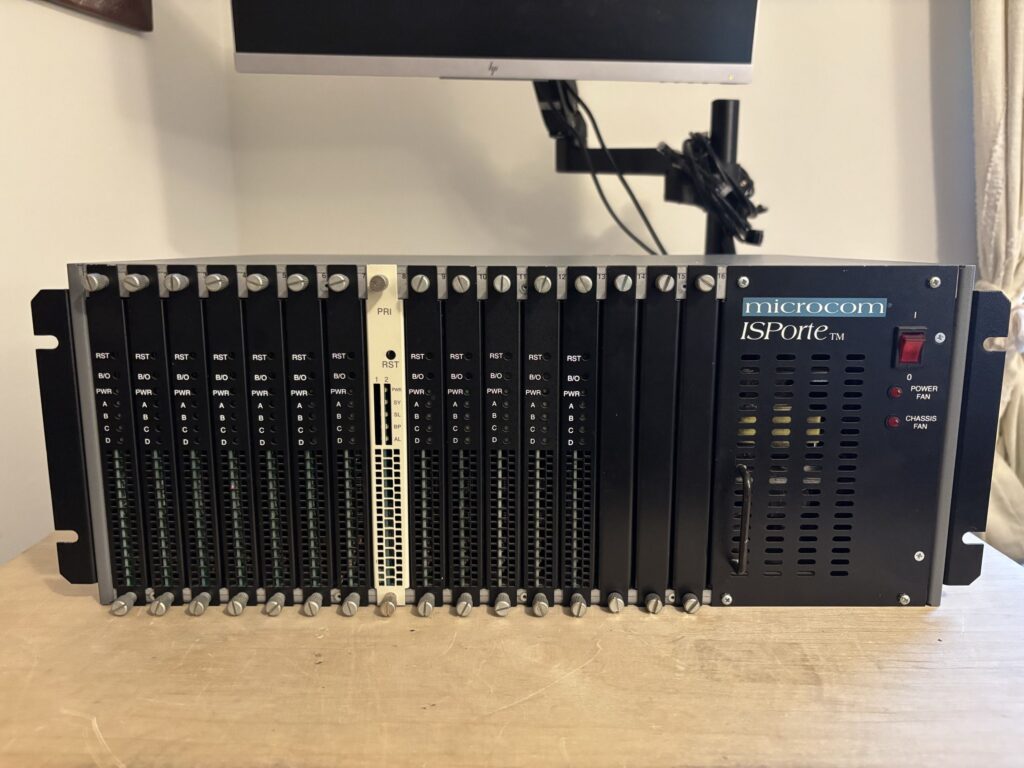
Front of the ISPorte
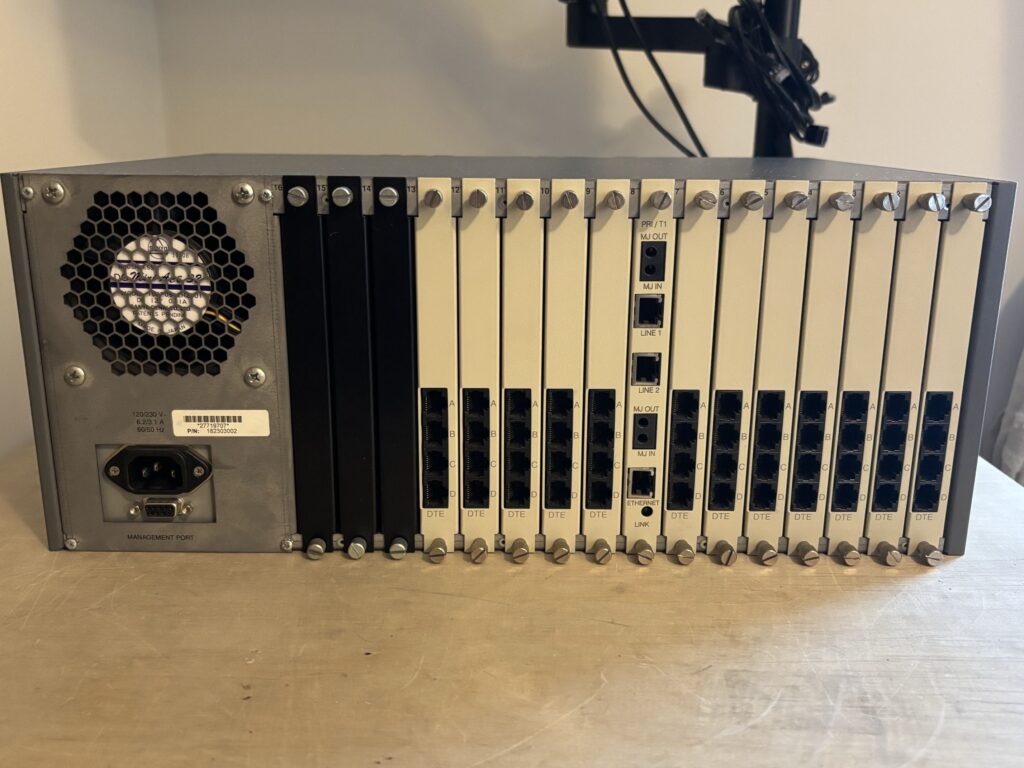
Rear of the ISPorte
Placing the chassis on my desk after carrying it upstairs really highlighted the hubris involved in this purchase. I had no idea how big this thing was, except for a few clues largely based on what I hoped were standard-sized LEDs, and, well, it is quite large and hefty. As promised by the photo, the front panel had 12 black cards and 1 white card. Upon closer inspection, the black cards have LEDs for A, B, C, D, and PWR, and two recessed momentary buttons for B/O and RST but lack any further labeling. We can guess that PWR and RST are likely power and reset, with B/O being “Busy Out”, aka taking that port offline. Given that there are 12 of them, and the seller described it as 48 modems, I assume that each card has 4 modems and the A/B/C/D LEDs represent the individual modems in some way.
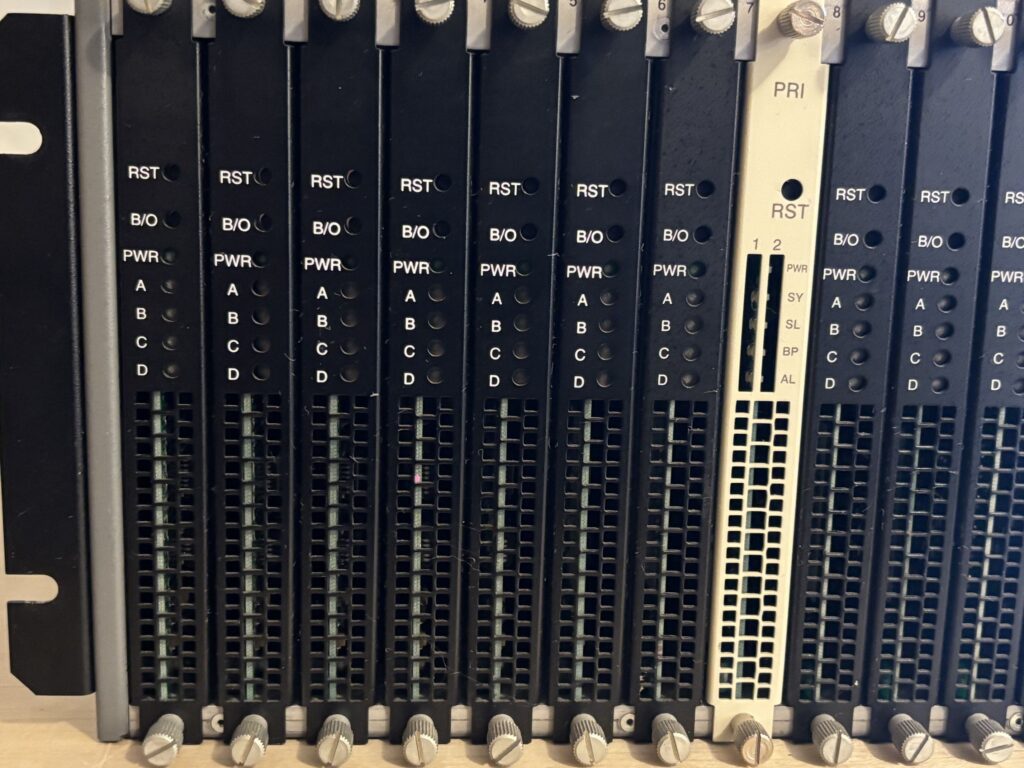
Close up view of the front faceplates
The white card has a PRI label at the top along with two columns of LEDS and accompanying PWR, SY, SL, BP, AL labels. PWR is likely power, SY I am assuming to be System, SL to be Slips, BP to be bi-polar issues, and AL is alarms.
Moving on to the back, there are indeed matching cards for each slot on the front. All of the cards have white faceplates, the black plates are blank covers (there are also covers on the last three slots on the front). The card matching the PRI slot in the front (slot 8) has corresponding ports and markings. There is an Ethernet jack with a link LED, two T1 circuits, and the two circuit test ports. The other cards all have four RJ45 jacks labeled A, B, C, D, and a DTE at the bottom. The DTE here likely stands for “data terminal equipment”.
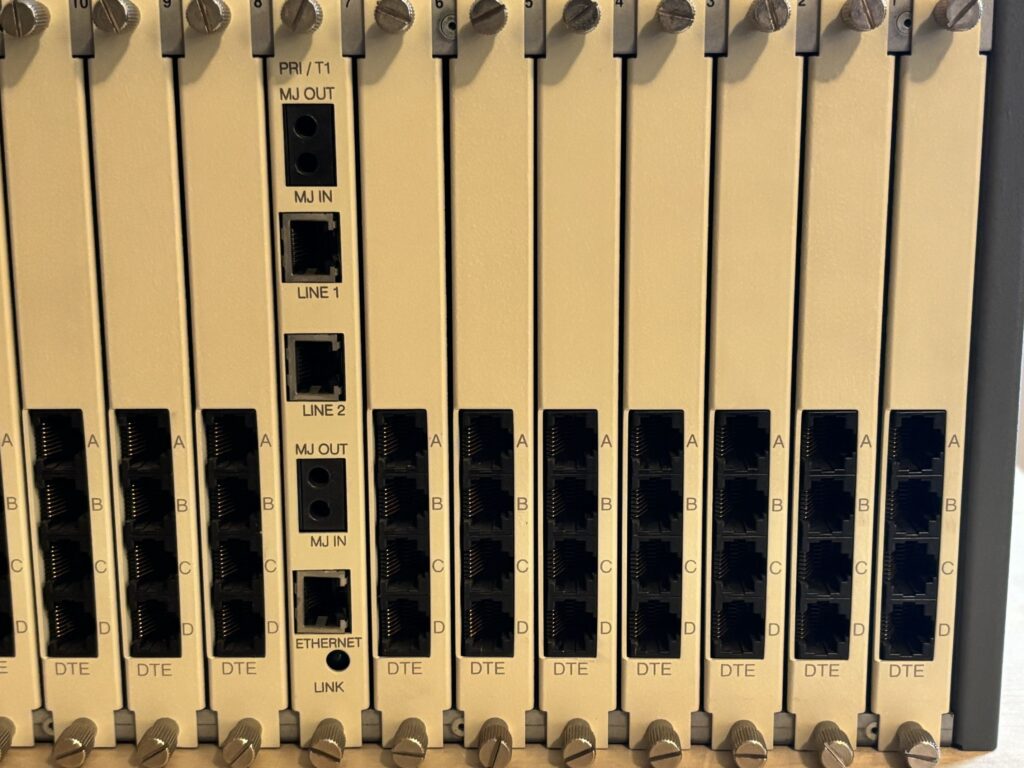
Close up view of the rear faceplates
Below is the power input and female DE9 management port. At this point, it is looking like the seller’s claim of two power supplies is not correct, but this is not an issue for me.
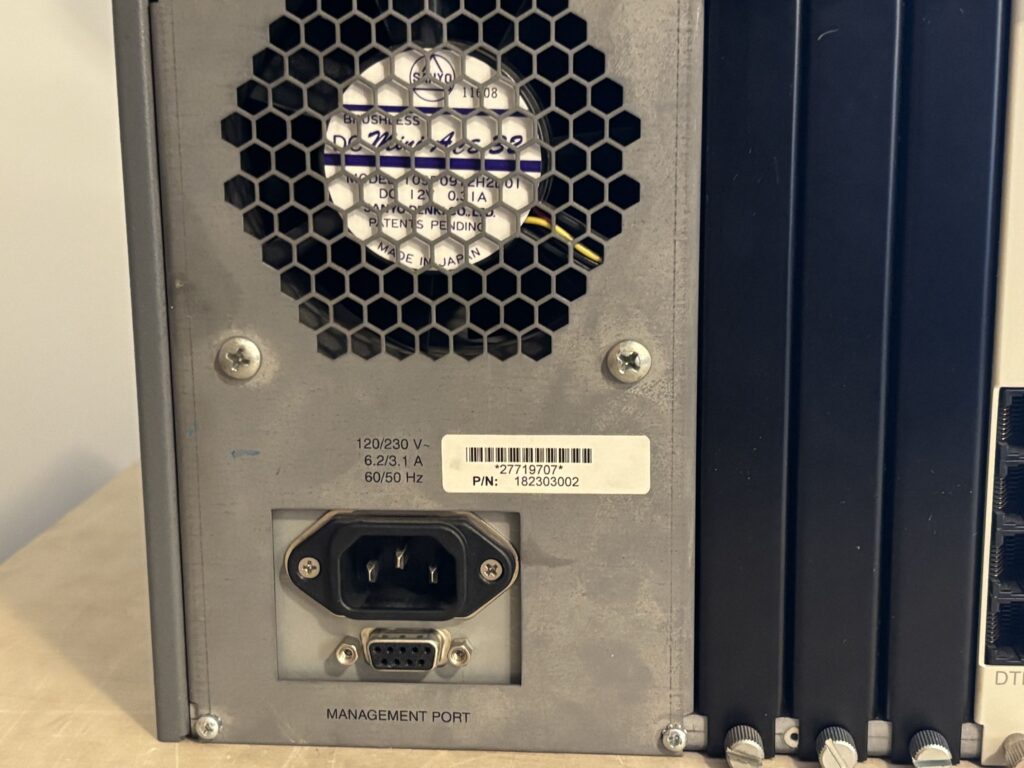
High and low voltage living in harmony
Stabbing in the dark…
I still had not uncovered much about the equipment now in my possession. I learned that Compaq had purchased Microcom in April 1997 (for $280 million in cash!), and had absorbed Microcom into their networking division. Many of Microcom’s products were related to dial-up or remote access in some way and had a limited life span once the new millennium arrived, making their existence on the internet almost nil. It was at this point that I decided to throw caution to the wind and plug it in, flip it on, and see if anything comes to life on the DE9.
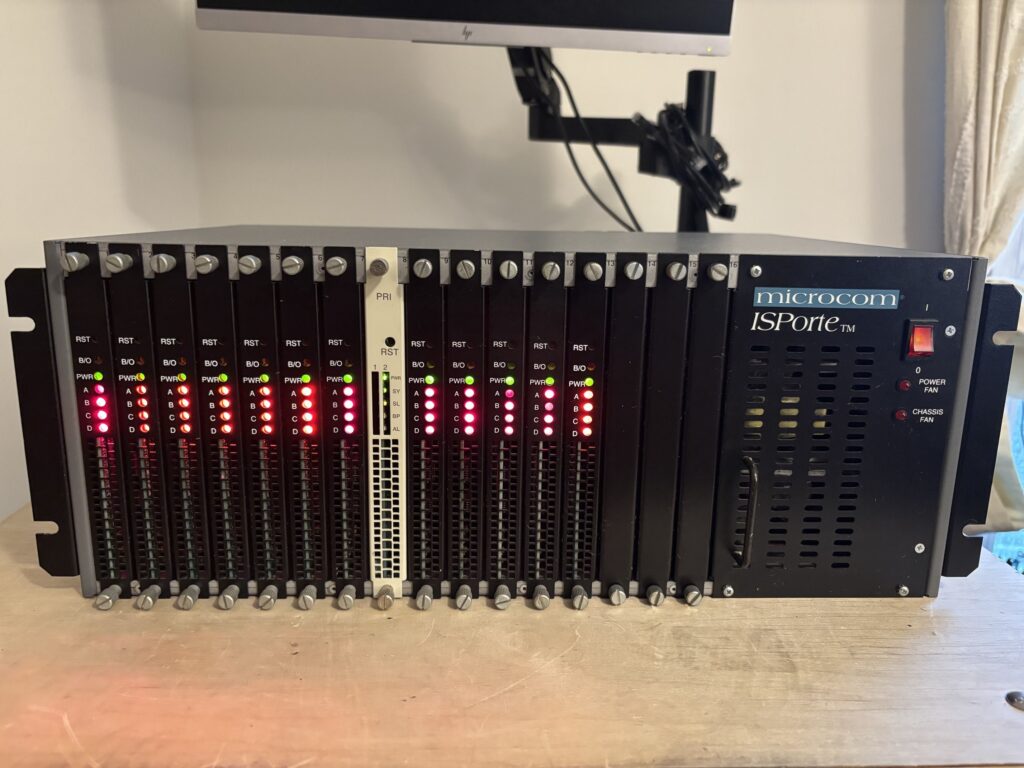
Red is always good
The epitome of healthy
It roared to life with fans that were quite angry about their sudden reanimation. There was, however, nothing to be seen on the management port. An attempt of using a null modem yielded no results, and the light show happening on the front panel was not encouraging. There appeared to be something wrong, and even worse, there were something wrong with a device that I knew nothing about. I have a RS-232 tester and connected it inline with the management port, and it gave indication of activity on CTS/RTS and DTR/DSR. However, the RX/TX LEDs showed no activity at all, and when I hammered on the enter my transmissions were never met with a response. Was it time to bust out the oscilloscope? Almost…lets try something else first.
Onward, to despair…
I decided to dig through archive.org and see what I could find. What I uncovered was both informative and enlightening and, for awhile, completely evaporated any hope I had of this project being successful. There are no downloads on archive.org relating to this modem chassis at all. No documents, no guides, no manuals – nothing but the aforementioned Boardwatch mentions. Looking through the Wayback Machine, I picked a time in the early 2000s and was greeted by a page that said Microcom had been purchased by Compaq and was now at compaq.com/networking. Navigating back in time quite a few years, I eventually landed on a page from 19972, which, if you navigate around a bit takes you to an original page for the ISPorte3. This discovery was both a blessing and a curse. Finally, I had found some documentation. There was basic information, datasheets, customer testimonials, and something new: an announcement of Version 2.0 of porteWATCH, the Intuitive Management Software for the ISPorte.

Note the lack of a download link4. Furthermore, I had rediscovered the lost art of Googlewhacking: the search term “microcom portewatch” yields exactly one result, a scanned PDF of a presentation given in Ecuador in 19985.

Google wasn’t the first search engine I tried, and it certainly wasn’t the last. I had started to wonder if this purchase was going to turn into an expensive shelf ornament, and, to be fair, it probably still is. But I needed to press on. For the next several days I poked and prodded at search engines, combing through any result that even remotely mentioned Microcom — something not helped by the fact that there are still numerous companies operating with this name. As part of my searches I eventually start including “compaq”, thinking that if they took over the company maybe they hosted some of the software for awhile or maybe the product line, but to no avail.
Eventually I came across Manot’s FTP index site, which did yield some results, however HP’s FTP server ftp.hp.com is long gone. I discovered that https://ftp.hp.com was responding but it did not allow directory listings. On a hunch I decided to test out one of the URLs from Manot except over HTTPS and… it worked! I whipped together a script and downloaded every file I found a reference to. Since then, https://ftp.hp.com seems to have gone offline sadly, but I have mirrored everything:
I started to sift through the collection and eventually found cm4k5037.exe, which turned out to be the last build of PorteWatch, now called Compaq Manager 4000. The easiest Windows machine I could access was a thin client running Windows 10. It refused to run the 16-bit installer directly but once I extracted the contents I was able to run the executable within. Once inside the app, I was shown a preview of each modem’s status where I was able to clear the “Busy Out” status and the angry LEDs. At this point I could not resist testing things, so I hooked up a PRI from a Cisco ISR with the hopes it was configured in a common way, and dialed in.
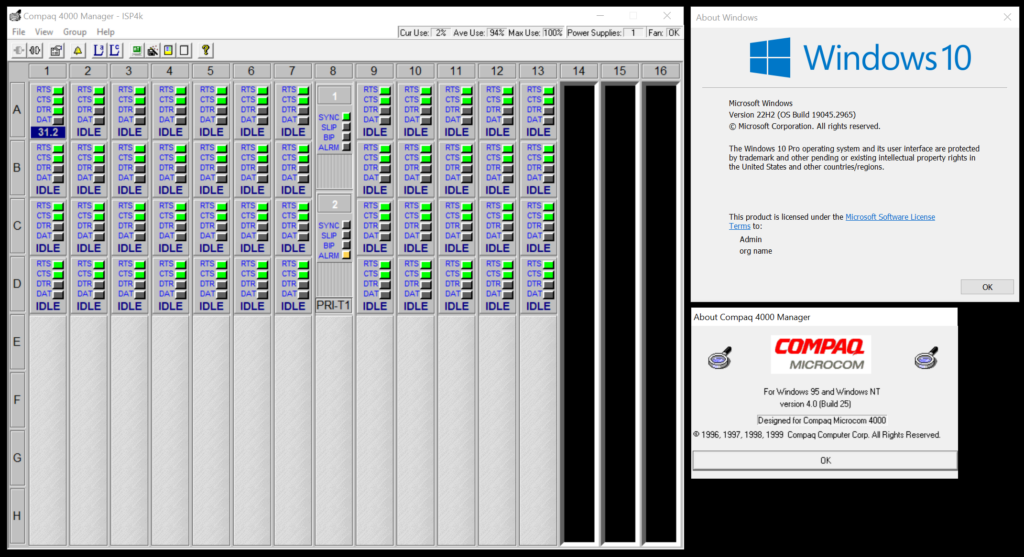
Not bad for software written in 1999
The handshake was successful, but only at 31,200bps. I had port A1 filled with a loop-back plug to get it to answer but, with no actual terminal server, I was soon disconnected. So, I had confirmation that the chassis was alive. I had some research to do in order to wire up a terminal server and establish a connection to the internet through the chassis.
That process will be completed in my next post where I get up close and personal with the Microcom ISPorte and its various quirks, form a hypothesis on the mystery of the white faceplates, and get reminded of just how useful embedded help files used to be.
- nerd_points– ↩︎
- https://web.archive.org/web/19970613204224/http://www.microcom.com:80/ ↩︎
- https://web.archive.org/web/19970613210604fw_/http://www.microcom.com/main/ProductsTech/centralsite/isporte/3_isp.htm ↩︎
- https://web.archive.org/web/19970613211637fw_/http://www.microcom.com/main/ProductsTech/centralsite/isporte/dspwatch.htm ↩︎
- https://www.dspace.espol.edu.ec/bitstream/123456789/3292/1/5811.pdf ↩︎